Emacs 31 Is Around the Corner: The Changes I'm Already Daily Driving


Karthik Chikmagalur recently published another of his excellent "Even More Batteries Included with Emacs" posts, digging into lesser-known features that already ship with Emacs today. I wanted to write its mirror image. His post covers the batteries already in the box. Mine covers the ones arriving in Emacs 31.
Emacs 31 isn't out yet, but I've been building it from both emacs-31
branch and master and daily driving it for months. Every time
something new and useful lands, I fold it into Emacs
Solo, my no-external-packages
config, and mark it with a small ; EMACS-31 comment so I remember to
revisit it once the release is official.
This post walks those breadcrumbs. Every change below is one I'm
touching in my config right now, with a note on what it does and why I
keep it. None of it requires a package. It's all either on master
already or close behind.
One disclaimer: Emacs 31 is still in development (actually in
pre-release phase), so names and defaults can shift before final
release. Everything below is what I'm running as of mid-2026. If
you're not building from emacs-31 branch or master, treat this as
a preview of what's coming.
Tree-sitter that just works
If I had to pick the single change I'm happiest about, it's this one.
For years, getting a *-ts-mode going meant manually populating
treesit-language-source-alist, calling
treesit-install-language-grammar, and praying your toolchain was set
up to compile the grammar. In Emacs 31 a lot of that ceremony goes
away:
(treesit-auto-install-grammar 'always) ; EMACS-31
(treesit-enabled-modes t)              ; EMACS-31
treesit-enabled-modes set to t switches the major modes that have
a tree-sitter variant over to it, and treesit-auto-install-grammar
makes Emacs offer to fetch and build the grammar when it's missing
instead of erroring out (more options are available like 'ask and
'ask-dir). This is the treesit-auto package experience, except now
the core does the work.
The knock-on effect shows up all over my config. I used to keep lines like these around to teach Emacs where each grammar lives:
(add-to-list 'treesit-language-source-alist
			 '(typescript "https://github.com/tree-sitter/tree-sitter-typescript" "master" "typescript/src"))
In Emacs 31 the grammar sources for languages like TypeScript, TSX,
Rust, TOML, YAML and Dockerfile live inside the modes themselves, so
I've got a trail of ;; EMACS-31 this is now defined on mode code
comments marking every block I get to delete once 31 ships. I'll take
less config that does the same job any day.

One foot-gun worth flagging if you share your Emacs directory tree
across machines of different architectures: the auto-installed grammars
are not segregated by architecture. An x86_64 .so and an
arm64 one land under the same name, so the binary built on one
machine won't load on the other. Something to keep in mind.
There are many more tree-sitter improvements coming to Emacs. The developers have been working tirelessly on it, Yuan Fu, along with many others, have been continuously improving the tree-sitter experience across multiple areas. From better language support to usability and performance enhancements, tree-sitter in Emacs continues to evolve at a remarkable pace.
A built-in markdown-ts-mode (experimental)
Emacs 31 ships a markdown-ts-mode in the box, and this one is close
to my heart. I started it. It grew out of a proposal I sent to
emacs-devel
back in early 2025, where the idea and the first version of the code
were mine.
I'd be doing the mode a disservice if I let you think it's a solo effort. Stéphane Marks came along a bit later, rolled up his sleeves, and has since become a co-author of the mode. He's the energy behind much of what makes it nice to use today. He didn't send a patch or two and move on; he stayed, pushing the mode well past what I'd sketched out and sweating the details that turn "it works" into "it's a pleasure." Much of the polish I'm about to brag about is his. The mode is ours now, and it's better for it.
Watching an idea make the round trip from a mailing-list message to core code, and picking up a great collaborator on the way, is one of the most rewarding things about hanging around the Emacs community.
(use-package markdown-ts-mode
  :ensure nil
  :defer t)
It gives you more than colors, and these are the parts I want to show off:
✔️ Org users will feel at home. The keybindings and editing feel stay close to Org: navigating headings, folding sections, moving between structural elements. If your fingers know Org, you won't have to relearn Markdown.
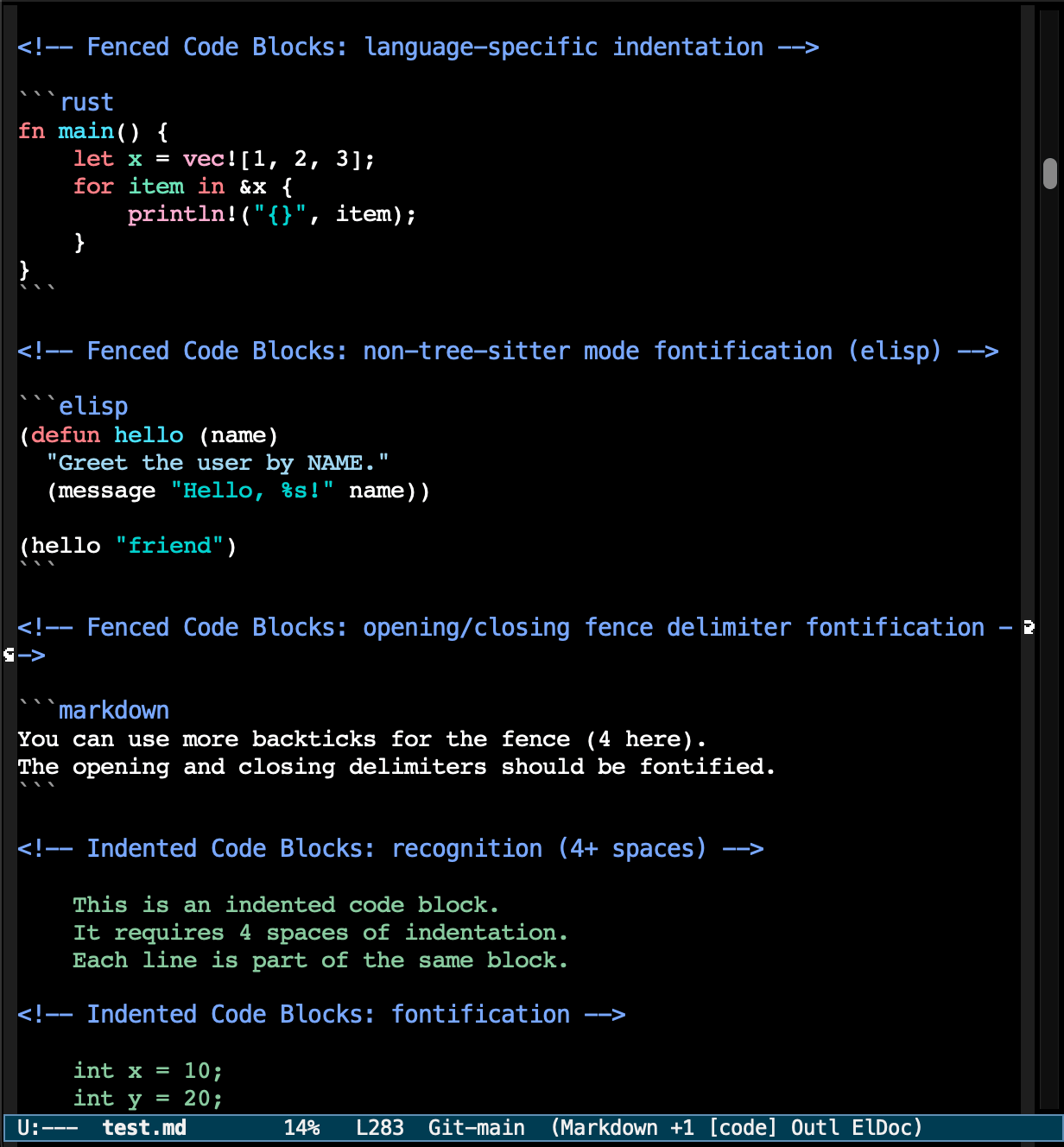
✔️ Live, colored code blocks, even for non-tree-sitter languages.
This is my favorite trick. A fenced code block gets fontified using
the real major mode for that language, not dumped as flat
monospace. It reaches Emacs' own internal modes too, so an
```elisp block lights up with true Emacs Lisp
font-locking, and the other built-in modes do the same. You get
proper syntax highlighting inside your code samples with no extra
setup.
And it's not just colors: the code-block editing commands largely work too, so you can edit a fenced block with the target language's mode rather than fighting plain text. Completion inside blocks is still the rough spot, that infrastructure is wonderfully twisty and we haven't fully cracked it yet, so if you go poking, that's where the bugs hide.
✔️ Inline image viewing. Image links render in the buffer, so a
Markdown doc with screenshots or diagrams reads like a document, not
a wall of  noise.
And many more features discoverable and being developed.
Together these make it feel like a comfortable place to write and
read Markdown inside Emacs, not a syntax highlighter bolted onto .md
files.
One caveat I want to be upfront about: markdown-ts-mode is still
experimental, and you have to opt into it. As the header of
markdown-ts-mode.el notes, it isn't wired up to auto-mode-alist
yet, so it won't take over .md files on its own. For now you pull in
the library with M-x load-library RET markdown-ts-mode, then turn it
on in a bufferf, or add it to auto-mode-alist yourself if you're
feeling brave.
Stéphane and I are working to get it considered ready by the next
Emacs release, and that's where you come in. If you try it and hit
rough edges, or it works great, we want to hear about it. Send
feedback to the bug
list with
M-x report-emacs-bug, or reach out to me and Stéphane directly.
Real-world use is what moves a mode from "experimental" to "done", so
don't be shy.
Many more screenshots here.
Eglot rendering docs with markdown-ts (also, still experimental)
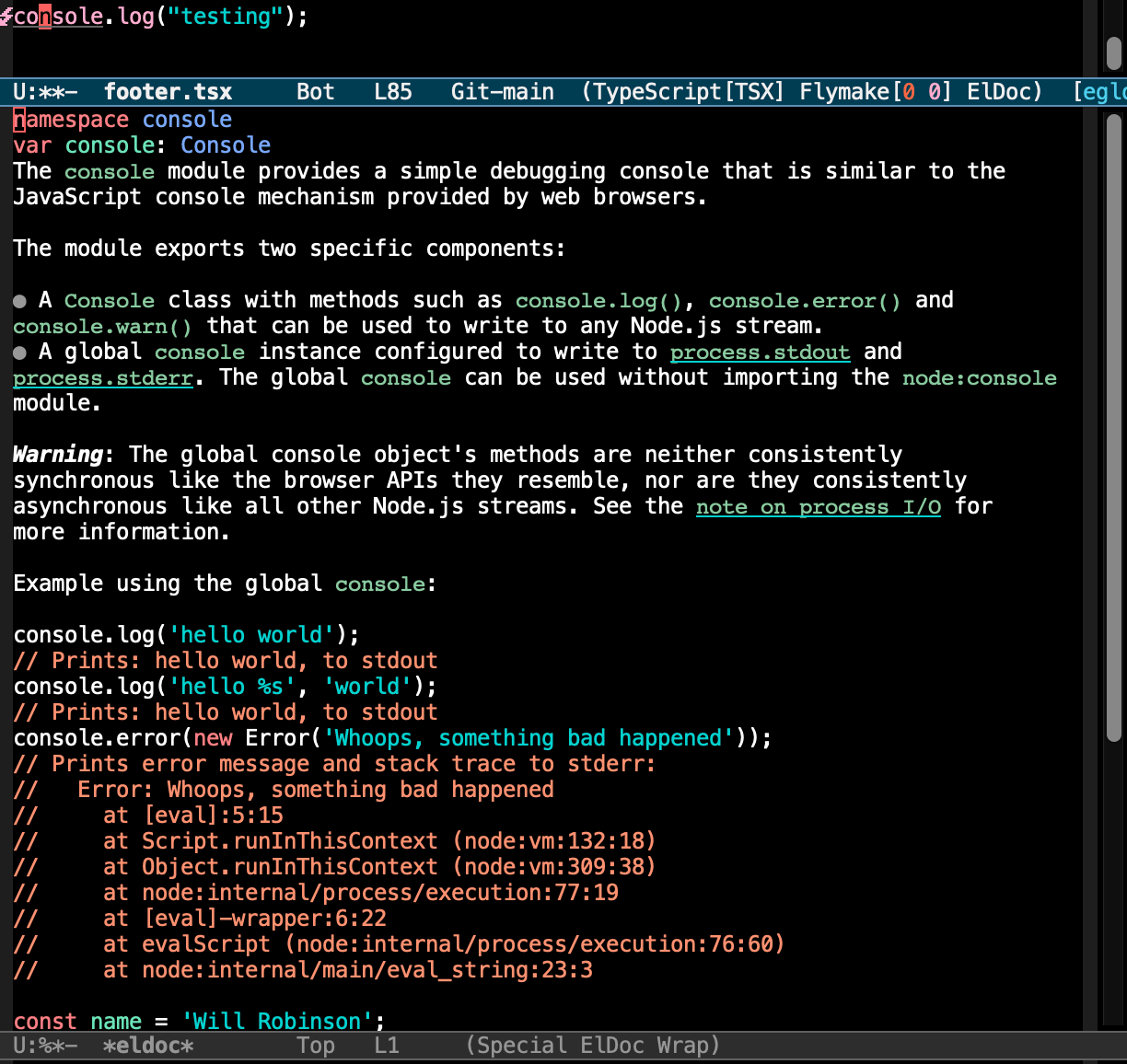
Speaking of Markdown, Eglot in Emacs 31 can render LSP documentation using that same internal mode instead of falling back to plain text:
(eglot-documentation-renderer 'markdown-ts-view-mode) ;; EMACS-31
(eglot-code-action-indications nil)                   ;; EMACS-31
markdown-ts-view-mode gives you formatted hover docs without pulling
in anything extra. The same experimental caveat applies here, since
it leans on markdown-ts-mode, so treat it as something to opt into
rather than a finished default. I also turn off
eglot-code-action-indications. The new inline "you can do a code
action here" hints are clever, but some language servers make them
noisy, so I keep them off.
There's also some churn here: eglot-events-buffer-size is on its way
out in favor of eglot-events-buffer-config, so I've left a
;; EMACS-31 -- do we still need it? note on the old variable to clean
up later.
eldoc at point
A small one I'm fond of:
(eldoc-help-at-pt t) ;; EMACS-31
With this on, eldoc shows the help text for whatever sits under the
cursor, without me invoking anything. Paired with
eldoc-echo-area-prefer-doc-buffer, it makes wandering through
unfamiliar code feel more guided.
Smarter, eager completion
The minibuffer and completion machinery picked up a few new toggles:
(completion-eager-update t)               ;; EMACS-31
(completion-eager-display 'auto)          ;; EMACS-31
(minibuffer-visible-completions 'up-down) ;; EMACS-31
completion-eager-update and completion-eager-display refresh the
completion UI as you type instead of waiting for you to ask. If you
don't run something like icomplete, setting eager display to t gives
you a sharp out-of-the-box experience on its own. And
minibuffer-visible-completions set to 'up-down lets you move
through the visible candidates with the arrow keys, which feels natural
at last.
icomplete got attention too, and this is another one I had a direct hand in. Emacs 31 includes the patch from bug#75784, which I proposed and worked on. It brings vertical in-buffer behavior and prefix indicators to icomplete. The side effect I like: a big compatibility block I'd been carrying in my config can finally go away:
(when (and (>= emacs-major-version 31)
		   (boundp 'icomplete-vertical-in-buffer-adjust-list))
  (setq icomplete-vertical-in-buffer-adjust-list t)
  (setq icomplete-vertical-render-prefix-indicator t))
Window layout gymnastics
This is a fun set of new commands for rearranging your window layout without manually splitting and killing windows:
("C-x w t"   . window-layout-transpose)        ; EMACS-31
("C-x w r"   . window-layout-rotate-clockwise) ; EMACS-31
("C-x w f h" . window-layout-flip-leftright)   ; EMACS-31
("C-x w f v" . window-layout-flip-topdown)     ; EMACS-31
Transpose swaps your horizontal and vertical arrangement, rotate spins the whole layout around, and the flip commands mirror it left-to-right or top-to-bottom. If you've ever built a three-window layout and then wished the editor pane were on the other side, these do the job and keep every buffer in place while they're at it.
A Speedbar that lives in a side window
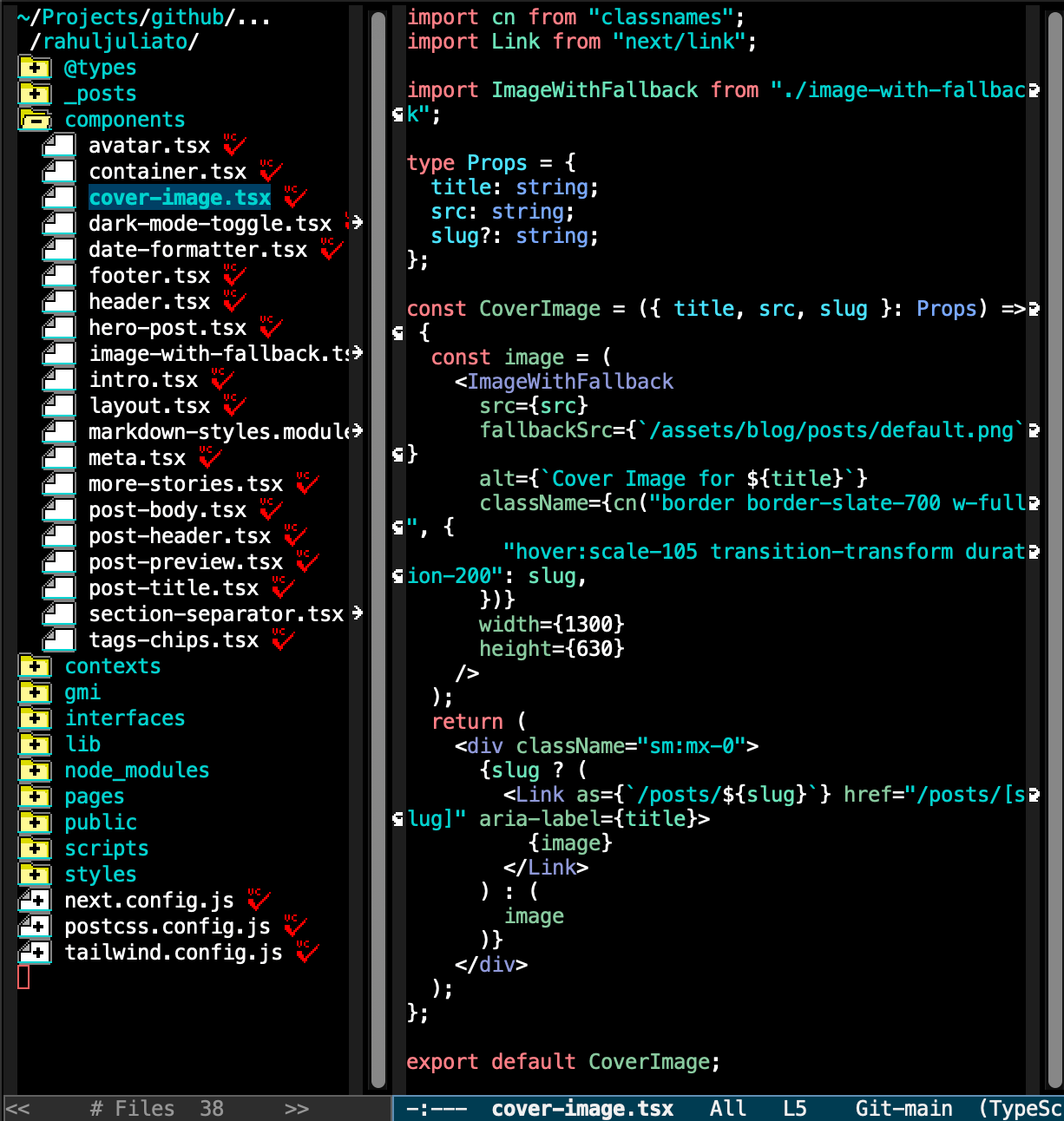
Speedbar has been around forever, but in Emacs 31 it learned to live in a proper side window instead of a separate frame:
(speedbar-window-default-width 25) ;; EMACS-31
(speedbar-window-max-width 25)     ;; EMACS-31

;; bound to M-I in my config:
(speedbar-window) ;; EMACS-31
speedbar-window docks it to the side like a modern file tree. On a
tiling setup or a single-monitor laptop, that beats the old
floating-frame behavior by a mile. A width cap keeps it from fighting
my other windows.
VC niceties
A few version-control improvements I've happily turned on:
(setopt
 vc-auto-revert-mode t                    ; EMACS-31
 vc-allow-rewriting-published-history t   ; EMACS-31
 vc-dir-auto-hide-up-to-date 'revert)     ; EMACS-31
vc-dir-auto-hide-up-to-date is the one I'm most pleased about.
Refreshing a vc-dir buffer now hides the up-to-date files on its own,
so I no longer need my g-key hack that called vc-dir-refresh
followed by vc-dir-hide-up-to-date. Another block marked for
deletion. vc-allow-rewriting-published-history nods to workflows like
Jujutsu and force-pushing feature branches, where rewriting
already-pushed history is a deliberate move.
Editable xref buffers
This one isn't a variable, it's a comment in my config reminding me to remove a custom hack:
;; EMACS-31 Remove this, since new emacs will come with 'e' for editing xref buffers.
;; Reference: https://debbugs.gnu.org/cgi/bugreport.cgi?bug=80616
I'm going to indulge myself and tell the longer version of this one, because I was part of it and it shows how features find their way into Emacs.
The itch was this. Both Dired and grep buffers have long had an "edit"
workflow. In Dired you toggle into wdired-mode; in a grep buffer you
press e for grep-edit-mode. Bulk renaming and bulk
search-and-replace feel natural there. Xref buffers had no such thing.
The only editing operation was r (xref-query-replace-in-results),
which is regex-only and won't let you edit individual lines. I lean
hard on project.el and xref for navigating and refactoring, and I
kept catching myself re-running the same search with M-x grep to get
an editable buffer. An annoying detour, since xref already held all the
information needed.
So in March 2026 I sent a patch to bug-gnu-emacs proposing a small
command, xref-export-to-grep, bound to E in *xref* buffers. It
re-fetched the xref items, formatted them as file:line:content, and
dropped them into a grep-mode buffer where you could press e and edit
as usual. Nothing fancy. It bridged two things that already existed,
and I'd carried it as a personal snippet for a while.
What happened next is the part I love about this community. Dmitry Gutov, who maintains xref, looked at it and pushed back on the UI of my approach. My command created a hop between buffers, and once you landed in the grep buffer you still had to know which key to press. He asked a sharper question than the one I'd answered: did I care about the grep export, or would it be better if xref buffers let you edit inline?
That reframing was right. I told him I had no attachment to the grep
detour. Inline editing in the xref buffer itself, with multi-line
edits across matches, would kill the whole roundtrip. A few days later
he'd written and pushed xref-edit-mode. It drops the extra step and
runs faster on large xref buffers. My original xref-export-to-grep
could still go in as an optional command without a default binding,
but the inline mode is the better answer and it's what I use now.
The thread didn't stop there. It spun off into a wider design chat with
Juri Linkov about the *-edit-mode family (occur/grep/xref, which
write each buffer normally) versus wdired's
queue-everything-then-C-x C-s model, and whether a future "live"
search UI might present results differently. For the record, here's the
safety net I mentioned in that thread, a trick I picked up from
Protesilaos that lets me hit d to diff a buffer against its file
before saving during save-some-buffers:
(add-to-list 'save-some-buffers-action-alist
			 (list "d"
				   (lambda (buffer)
					 (diff-buffer-with-file (buffer-file-name buffer)))
				   "show diff between the buffer and its file"))
Back to the topic, the end result: Emacs 31 ships editable xref
buffers, my config drops a homegrown workaround, and the feature that
landed beats the one I proposed, because the maintainer asked the
right question. Getting to play a small part in that loop is a big
chunk of why I enjoy living on master. The full back-and-forth is
public in
bug#80616 if
you're curious.
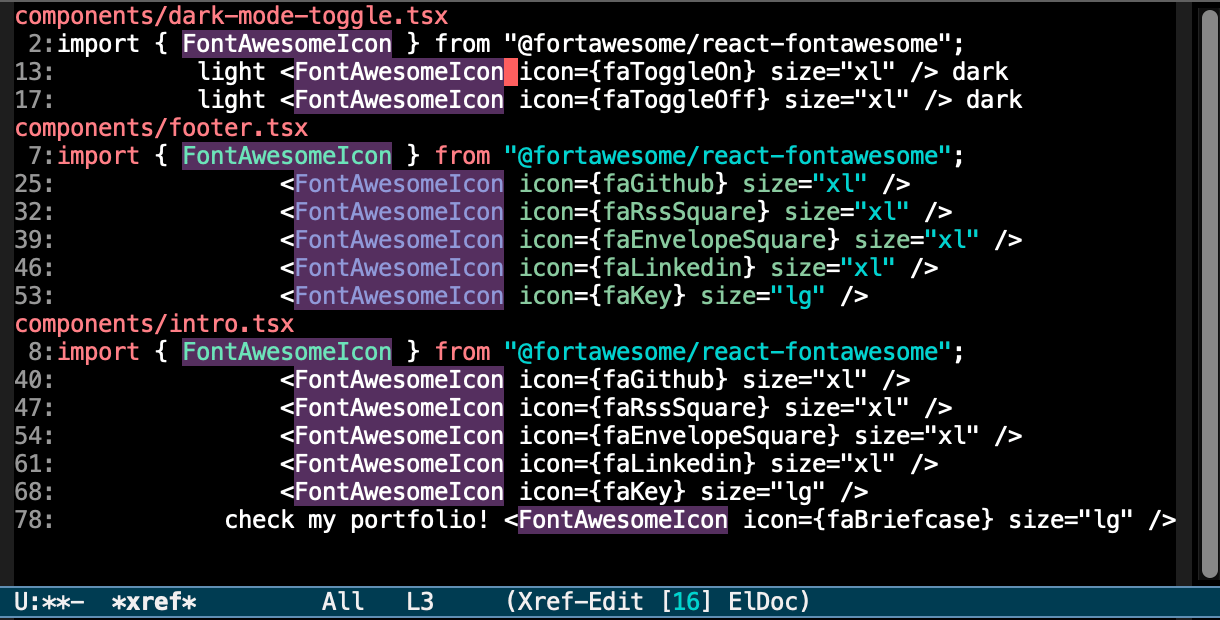
So, if you would like to try it. After C-x p g, grep for something
like FontAwesomeIcon. Now e starts the edit mode, make your edits,
C-c C-c to confirm.
ERC gets tidier
A couple of IRC improvements, since I live in ERC:
(erc-log-insert-log-on-open 'erc-log-new-target-buffer-p) ;; EMACS-31
This makes ERC insert prenvious logs only for newly opened target
buffers, the behavior I want when rejoining channels. And one of my
favorite small fixes: in Emacs 31 the scrolltobottom module no longer
depends on erc-fill-wrap, so I can drop the conditional that used to
add it by hand for older versions. Thank you to whoever untangled that.
The grab bag of quality-of-life knobs
And then there's the long tail of tiny improvements that don't each deserve a section but absolutely earn their place:
(delete-pair-push-mark t)                    ; EMACS-31: pushes a mark after
											 ; delete-pair so C-x C-x selects what was inside
(ibuffer-human-readable-size t)              ; EMACS-31: KB/MB instead of raw byte counts
(ielm-history-file-name ...)                 ; EMACS-31: IELM input history is finally persisted
(kill-region-dwim 'emacs-word)               ; EMACS-31: C-w with no region kills a word
(native-comp-async-on-battery-power nil)     ; EMACS-31: stop native-comp jobs on battery
(view-lossage-auto-refresh t)                ; EMACS-31: live-updating C-h l, great for teaching/debugging
(display-fill-column-indicator-warning nil)  ; EMACS-31
(dired-hide-details-hide-absolute-location t); EMACS-31: hide the absolute dir path in dired-hide-details-mode
(world-clock-sort-order "%FT%T")             ; EMACS-31: sort the world clock sanely
(zone-all-frames t)                          ; EMACS-31
(zone-all-windows-in-frame t)                ; EMACS-31
(uniquify-after-kill-buffer-flag t)          ; EMACS-31: renamed from the -p variant
A few of these are worth a sentence:
✔️ kill-region-dwim fixes a decades-old papercut. Set it to
'emacs-word and hitting C-w with no active region kills a word
backwards instead of signalling an error. No more "the mark is not
active" interruptions.
✔️ view-lossage-auto-refresh turns C-h l into a live view of
your last keystrokes. When I'm screen-sharing or teaching, people can
watch the keys I press in real time.
✔️ ielm-history-file-name lets my IELM scratch sessions survive a
restart, the way comint and the shell already do.
✔️ native-comp-async-on-battery-power nil saves the laptop: no
surprise fan spin-ups from background native compilation while I'm
unplugged on a train.
✔️ tty-tip-mode brings tooltips to the terminal, a nice touch for
those of us who run Emacs in -nw.
Honorable mention: term stops eating lines
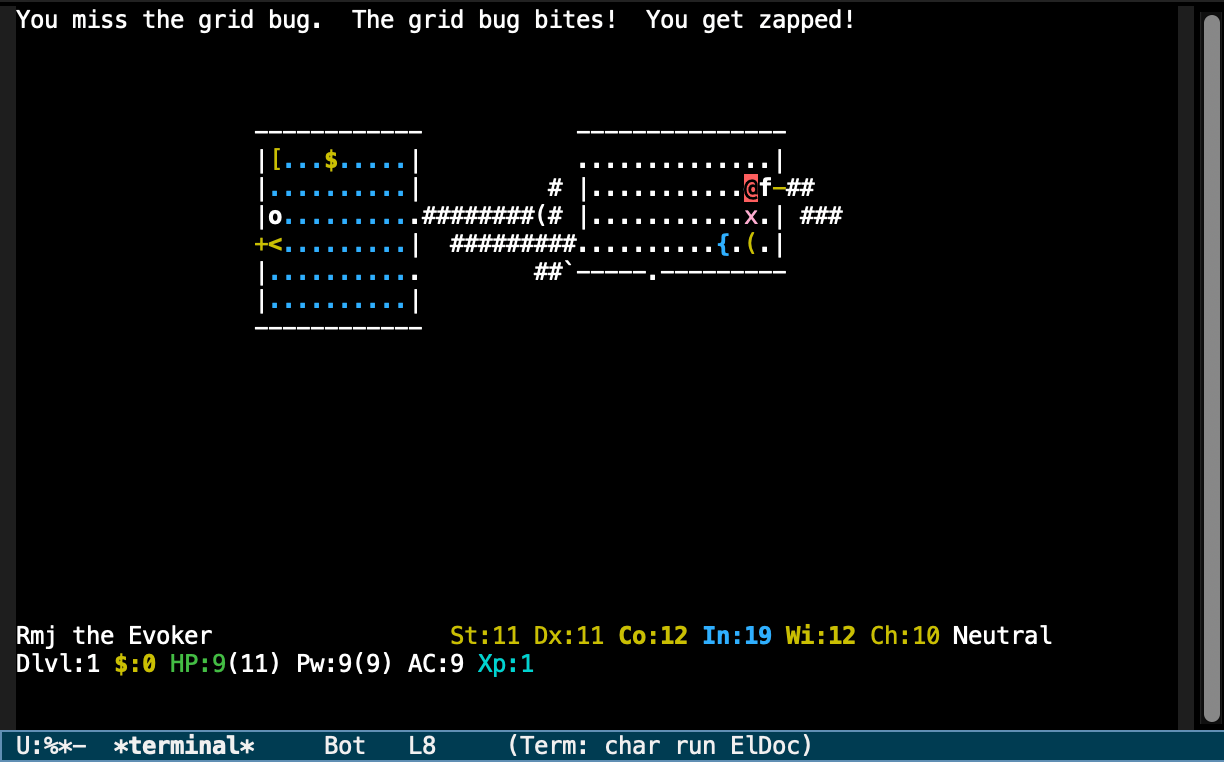
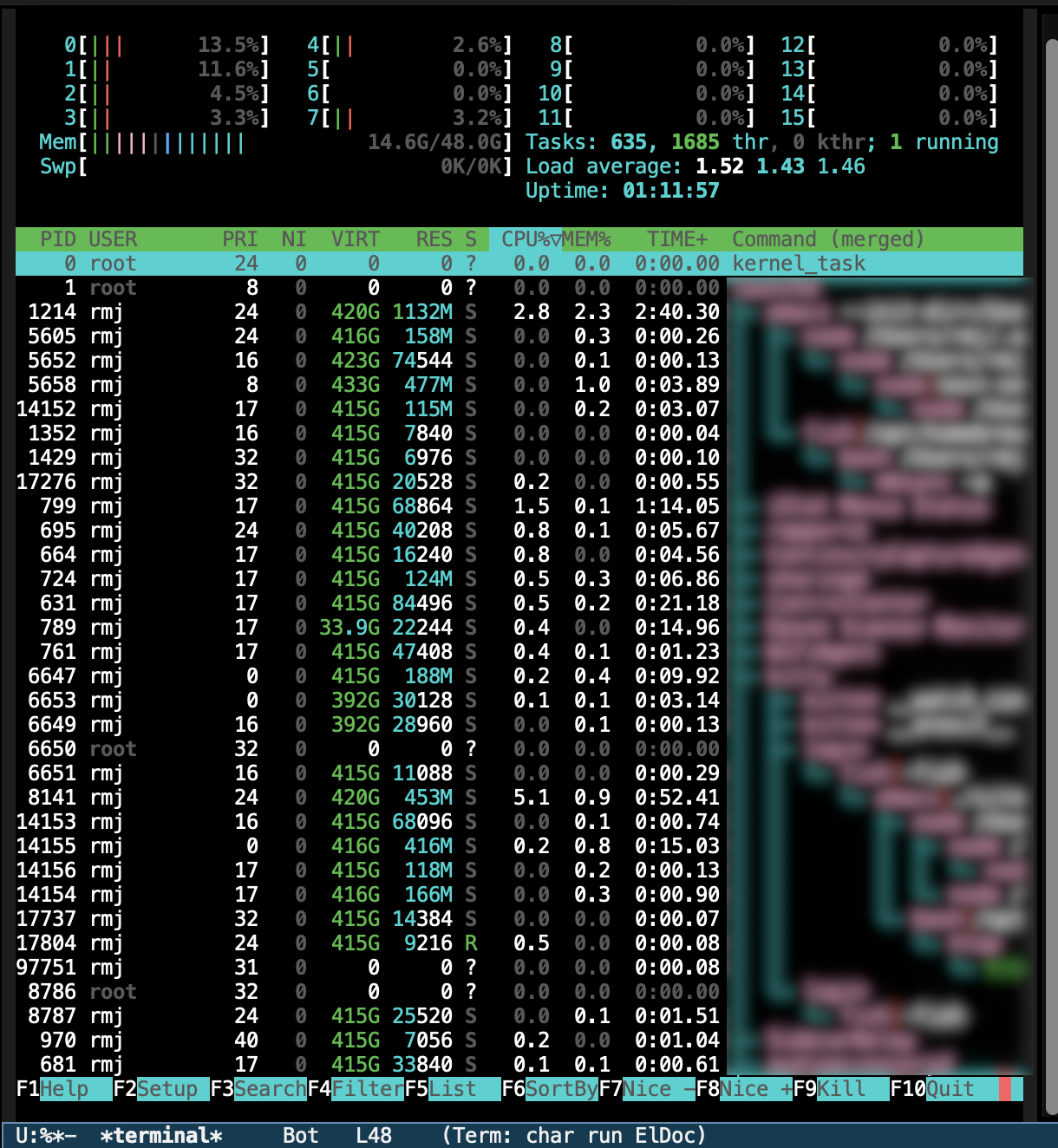
This one gets no config line, because there's nothing to configure. A bug got fixed, and it makes me happier than it has any right to.
For a long time, term (and ansi-term) had a nasty habit of
swallowing lines. Full-screen, cursor-addressing programs left the
display garbled, with rows eaten or misplaced as the program redrew.
That hit the exact programs you most want a real terminal for: htop,
nethack, anything curses-based was close to unusable inside Emacs'
terminal.
Emacs 31 fixes it. term redraws correctly now, and I can run htop
to watch processes or fire up nethack for a "quick" break without the
buffer turning into confetti. It sounds small, and it removes one of
the last reasons I had to reach for an external terminal emulator.
Honorable mention 2: Modus 5 themes!
Thanks to Protesilaos, Emacs now ships with several modus themes:
✔️ modus-operandi-deuteranopia -- Deuteranopia-optimized theme with a white background.
✔️ modus-operandi -- Elegant, highly legible theme with a white background.
✔️ modus-operandi-tinted -- Elegant, highly legible theme with a light ochre background.
✔️ modus-operandi-tritanopia -- Tritanopia-optimized theme with a white background.
✔️ modus-vivendi-deuteranopia -- Deuteranopia-optimized theme with a black background.
✔️ modus-vivendi -- Elegant, highly legible theme with a black background.
✔️ modus-vivendi-tinted -- Elegant, highly legible theme with a night sky background.
✔️ modus-vivendi-tritanopia -- Tritanopia-optimized theme with a black background.
Why bother running master?
People ask why I daily drive an unreleased Emacs. Same reason I run a no-packages config: I want to know what's in the box, and the way to learn what's coming is to live in it. Most of these changes are small, yet they add up to an editor that needs less of my glue code each release. Watching my config get shorter as the core absorbs things I used to hand-roll is one of the quiet joys of being an Emacs user.
For the other side of this coin, the batteries already there waiting to
be found, go read Karthik's
post.
It's a great companion to this one. And to see every snippet above in
context, they're all in the
Emacs Solo init.el, each
marked with that small ; EMACS-31 breadcrumb.
See you when 31 ships, at which point I get to go delete a pile of code. Happy hacking.
Edit
2026-06-29: Updated treesit-auto-install-grammar to 'always.
2026-06-18: Thanks to Stéphane Marks for the careful read and
corrections. He flagged the tree-sitter architecture foot-gun for
shared config directories (now noted above), pointed out that
markdown-ts-mode's code-block editing commands work and not just the
highlighting, and caught that the VC variable is now
vc-dir-auto-hide-up-to-date, not the name I'd written.